
Features
Features
Home
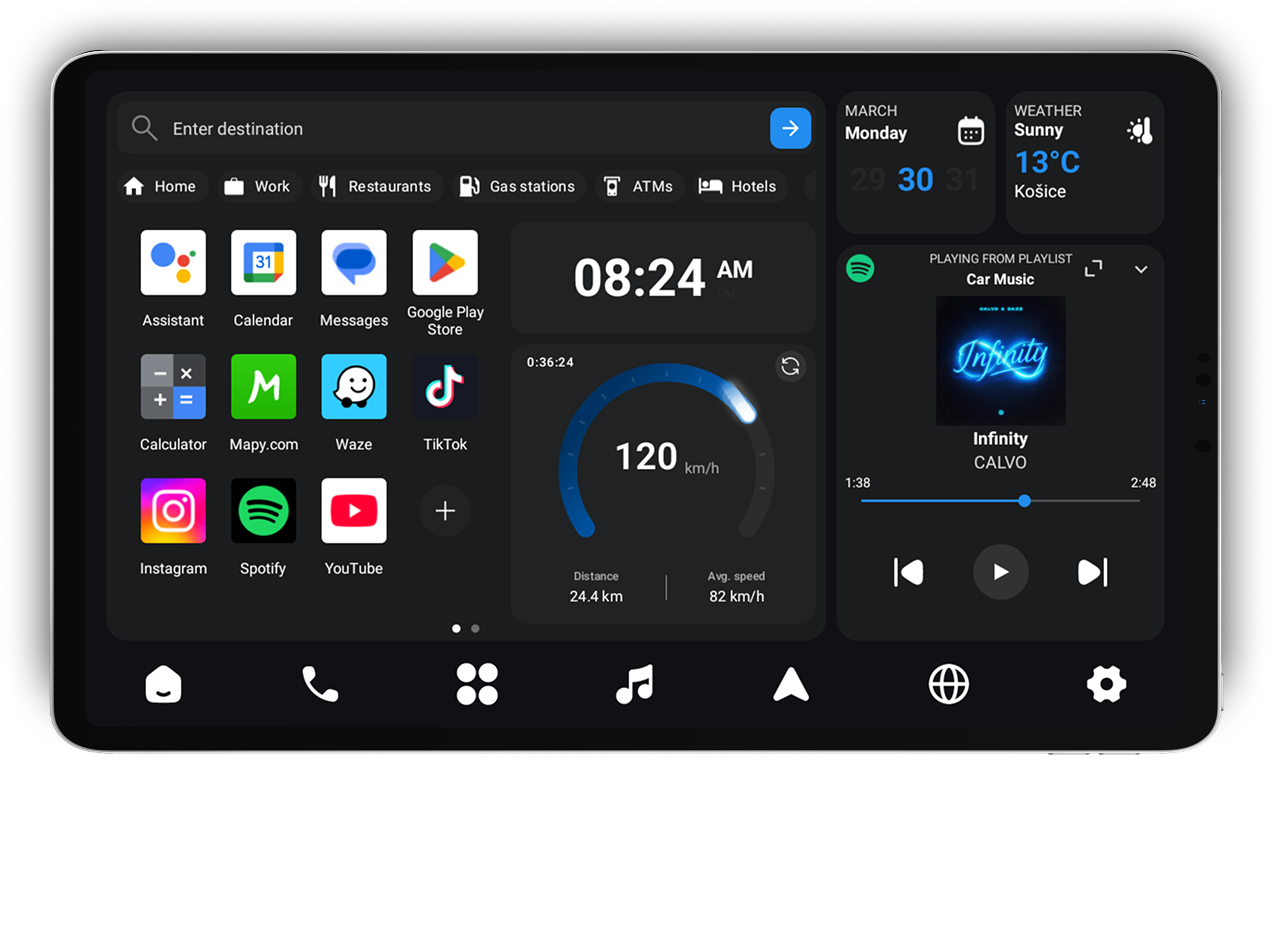
Your main driving screen combines a widget dashboard, quick app access, and instant navigation in one swipe-friendly layout.
Widget Dashboard
See speed, clock, calendar, live weather, and other essentials at a glance while driving.
Media Widget
Control music directly from the home screen without switching away from your dashboard.
Swipe Between Views
Swipe between the widget dashboard and the map view for faster access on the road.
Quick Access Apps
Pin up to 12 apps on the home screen for one-tap access, and reorder them with drag and drop.
Custom Shortcuts
Create navigation shortcuts for saved addresses and favorite places, then launch them instantly from the home screen.
Google Navigation SDK
Turn-by-turn navigation with accurate ETAs, rerouting, voice guidance, and rich map detail built in.
Places Search
Quickly find addresses, businesses, and landmarks with useful details like opening hours and ratings.
Points of Interest
See nearby essentials like restaurants, hotels, gas stations, and ATMs with one-tap navigation.
Dynamic Map
Smooth zooming, panning, route rendering, and clear landmarks designed to stay readable while you drive.

Radio
Stream 50,000+ online radio stations from around the world right from your dashboard.
Massive Catalog
Browse a huge and constantly growing library of stations across genres and countries.
Smart Discovery
Search by station name or country to quickly find exactly what you want to hear.
Favorites & Recents
Save stations you love and jump back to recently played stations in one tap.

Phone
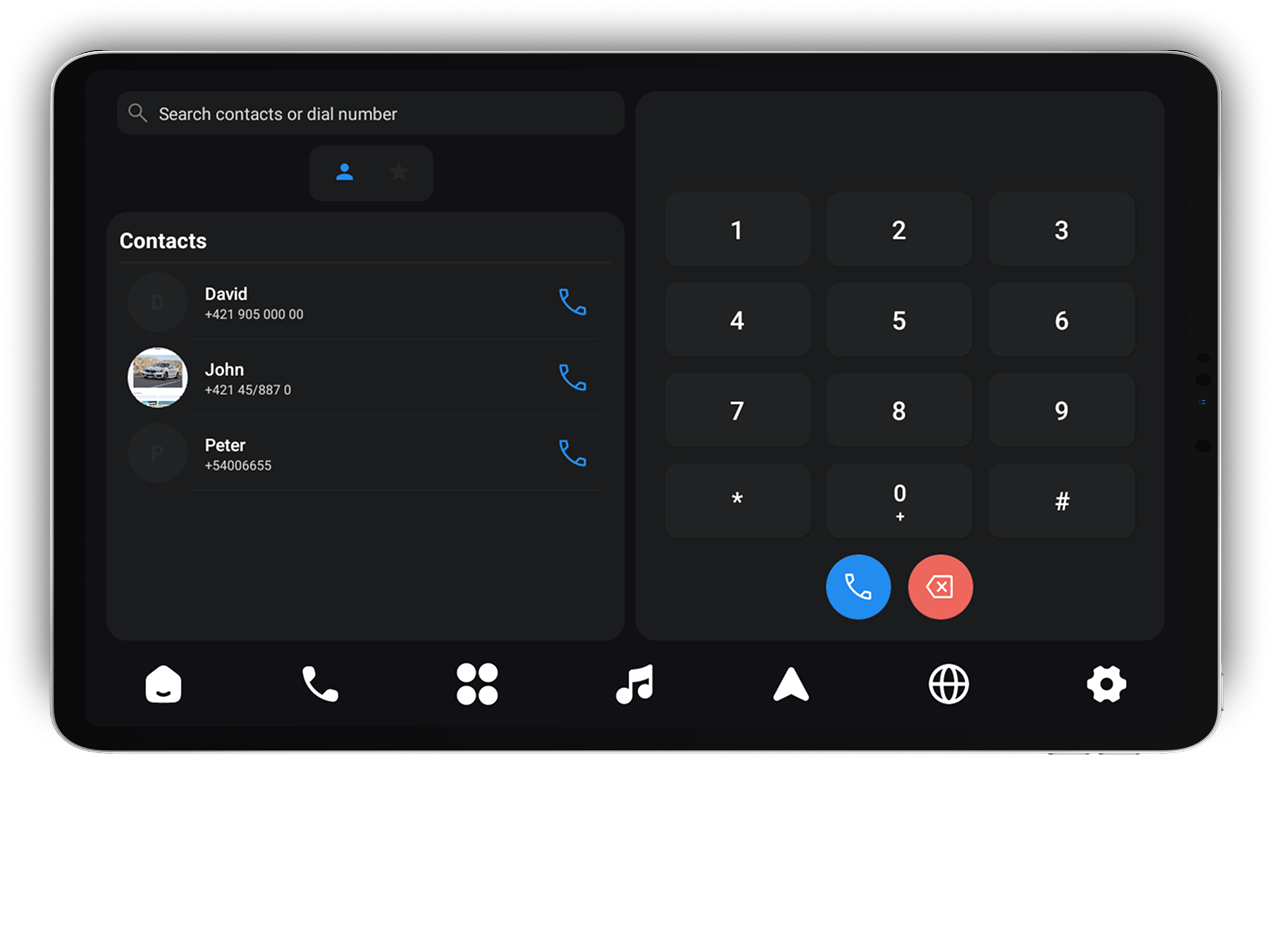
A call-ready hub with contacts, favorites, call history, and search—built for safer use on the road.
Contacts
Browse your phonebook in large, readable rows optimized for in-car use.
Favorites
Pin your most-used contacts for faster access while driving.
Dial Pad
Use a large, car-friendly keypad designed for quick and reliable input.
Search
Find contacts fast by name or number without digging through long lists.
Apps
Browse installed apps in a clean, car-friendly grid with large touch targets and fast search.
Full App Grid
See all launchable apps in one organized grid for quick access while driving.
Search
Filter apps instantly and find what you need without unnecessary taps.

In-App Web Browser
A lightweight browser built into the launcher for quick lookups without leaving your dashboard.
Quick Search & URL
Type a search query or enter a URL directly and open it without switching apps.

Customization
Personalize the launcher to match your preferences, driving habits, and dashboard setup.
Language & Units
Choose your language, speed and distance units, time format, currency, and weather units.
Display & Theme
Switch themes, adjust brightness, and keep the screen active when driving.
Layout
Place the main panel where it fits best—left, right, or bottom.
Defaults
Set Car Launcher as your default home experience for faster startup.
Dynamic Spotify Widget
Let the Spotify widget adapt its background to the currently playing track with animated color changes.
Tailor the launcher
Adjust theme, layout, units, brightness, and default launcher behavior.
Floating button
A floating button appears when the launcher runs in the background, giving you instant one-tap access back to the app.
Drag & Drop
Press and hold to move the floating button anywhere on the screen.
Quick Return
Tap the button to jump straight back to Car Launcher at any time.
Spotify Remote Controller (Beta – invite-only for now)
Control Spotify from your dashboard with playback controls, track info, and playlist access—currently in beta.
Full Playback Controls
Play, pause, skip, scrub, and adjust volume while keeping track info visible.
Library & Playlists
Browse liked songs, albums, and playlists, then start playback in one tap.

Choose your experience
Lite is a one-time purchase linked to your signed-in account and unlocked for lifetime use. Pro includes integrated Google Navigation directly inside the app, including place search, nearby places, POI clicks, map interaction, and turn-by-turn navigation.
Lite
The same core launcher experience as Pro, but navigation opens in an external app selected in Settings.
See price in app
One-time purchase • Lifetime access
Included
- Integrated Google Navigation inside the app
- Use an external navigation app selected in Settings
- Dynamic mini-map on Home
- Radio and live weather
- Apps, Phone, Browser, and Home widgets
Lite is linked to your signed-in account and unlocked for lifetime use.
Pro
Integrated Google Navigation runs directly inside the app, with plans that mainly differ in usage quotas.
See price in app
Monthly subscription
Included
- Integrated Google Navigation inside the app
- Place search, nearby places, and POI clicks
- Map interaction and turn-by-turn navigation
- Dynamic mini-map on Home
- Radio and live weather
Final price is shown in Google Play checkout and may vary by country and tax.